
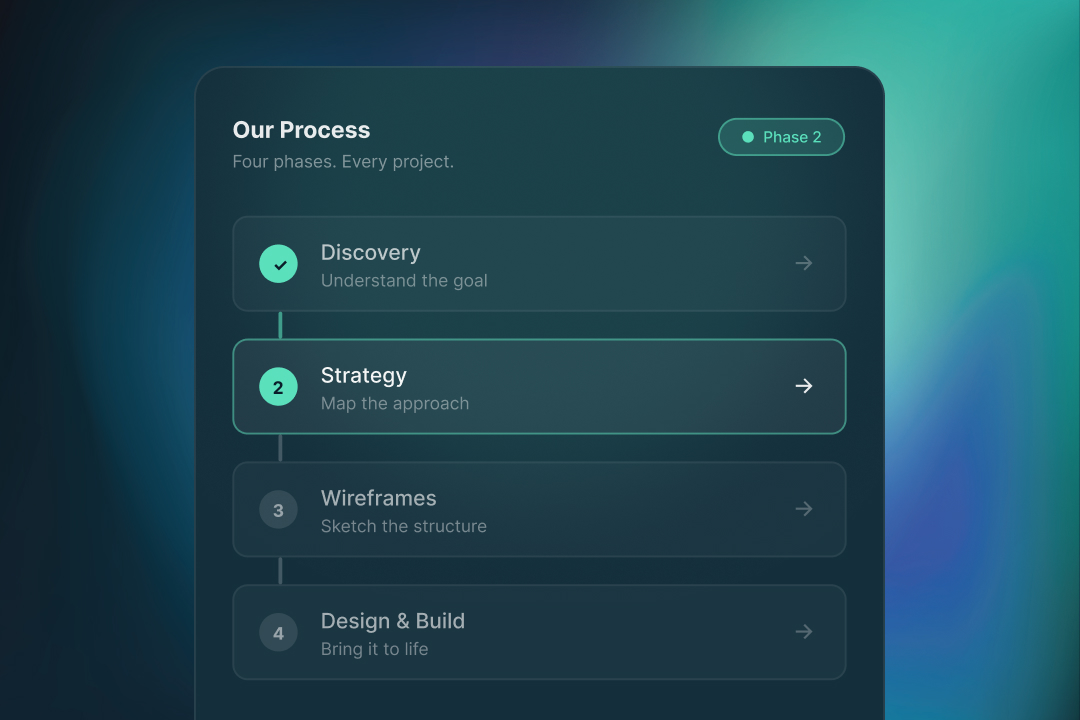
Most design projects go sideways in the same place.
Somewhere around week three, the client says "I just don't love it." The designer revises. The client still doesn't love it. Another round of revisions. Everyone is frustrated, the timeline slips, the budget stretches, and the project limps to launch.
The cause is almost always the same. The project started with "let's make a website" instead of "what are we trying to achieve, and for whom." Without that foundation, every design decision becomes a matter of taste, and taste is infinite. You can always not love it.
The process we use at Brightline is designed to prevent exactly that dynamic. It puts strategy and wireframes ahead of any visual design, not because that is how textbooks say to do it, but because we have watched what happens when you skip those phases, and it is painful.
Here is how the process actually works, phase by phase, with honest notes on what each one produces and why skipping it costs you.
Phase 1: Discovery
Discovery is two or three meetings and a shared document. Nothing glamorous. Everything downstream depends on it.
In discovery we ask:
- What does the business actually do, and for whom?
- What is working today? What is not?
- What do your best customers have in common? What do the bad-fit customers do that drains you?
- Who are you competing with for attention, not just for sales?
- What does the website need to accomplish? What would "this worked" look like a year from now?
- What have you tried before that didn't work, and why do you think it didn't?
We take notes. We ask follow-ups. We push gently on things that don't add up.
By the end of discovery, you and we should be aligned on what the project is actually for. Often, we are the first team who asks these questions at this depth. That alone usually reshapes the brief.
Why skipping this costs you: Without discovery, the project starts with assumptions instead of understanding. You design a website for a version of the business that isn't quite real. Three months later you are wondering why the site doesn't feel right.
Phase 2: Strategy
Strategy is where we translate the discovery into decisions.
We work through:
Positioning. What are you, clearly, and what are you not? Who is this website speaking to?
Messaging hierarchy. On the homepage, the service pages, the about page, what are we saying first, second, and third? What are we not saying at all?
Site structure. What pages exist? Why each one? How do they connect? What is the primary path we are guiding most visitors through?
Conversion strategy. What do we want a visitor to do? What is the low-commitment alternative for people who aren't ready? How do we catch them?
Success metrics. How will we know, 90 days after launch, whether this project worked?
The output is a strategy document. Usually 10-15 pages. It is the contract for what comes next. When a visual design decision is in question later, we can point back to the strategy and say "we decided X because of Y." That ends most debates.
Why skipping this costs you: Without strategy, every design decision is unmoored. You end up arguing about whether the button should be green or navy, when the real question is what the button is trying to accomplish.
Phase 3: Wireframes
Wireframes are the skeleton of the site. Black, white, gray, text. No colors, no fonts, no photos.
Wireframes feel underwhelming. That is their job. They force you (and us) to evaluate the work on structure and content, not on how it looks. Does the information flow right? Is the primary message clear? Are we asking the user to do too much? Is the hierarchy supporting the strategy?
This is also the phase where we expose copy problems. If a section needs 400 words to make sense at this stage, that is a copy problem, not a design problem, and we can fix it before it becomes an expensive revision later.
Wireframes go through 1-2 rounds of revision. Once they are right, the rest of the project moves fast.
Why skipping this costs you: If you go straight from "we want a new website" to full color mockups, every revision happens in the most expensive place (visual design) instead of the cheapest place (wireframes). A layout change in wireframes takes an hour. The same change after full visual design takes a day. Multiply by 20 revisions and you can see the problem.
In my agency years, I cannot count how many projects skipped wireframes because "we don't have budget." Every single one of them cost more in the end, because we were revising pixel-level decisions that should have been structure-level conversations. Wireframes are cheaper than not having them.
- Michaela Fodorova, Design & Development
Phase 4: Visual design
Now we design.
The visual design phase takes the approved wireframes and adds the brand layer: colors, typography, photography, illustration, motion, the works. Because the structure is already decided, the visual design phase is about making the approved structure feel like you.
We usually present full homepage and one or two key interior pages first. You review. We refine. Then we extend the design system across the rest of the pages.
Why skipping or rushing this costs you: A site that was wireframed well but visually rushed feels cheap. Small details (spacing, type scale, color balance, photography choices) are what separate a good-feeling site from a thin one. Give this phase the time it needs.
Phase 5: Copy
Copy often runs in parallel with visual design, not after. Here is how it typically breaks down:
- You provide the raw content (or we co-write it together in a workshop)
- We shape the copy to fit the structure, hierarchy, and voice
- We write microcopy (buttons, labels, empty states) to match
- We review copy with you before it enters the designs
Copy is one of the easiest places to break a good design. A beautiful hero with mediocre copy underperforms a plain hero with sharp copy. We spend real time here.
Phase 6: Webflow build
Once visual design is approved, we build in Webflow.
The build phase is where we translate designs into a live, responsive, fast, CMS-ready site. It includes:
- Clean, maintainable Webflow structure that your team can edit later
- CMS setup for any dynamic content (blog, case studies, team, FAQs)
- Custom interactions and animations where they support the experience
- Responsive behavior tested on real devices, not just the Webflow preview
- Accessibility checks (color contrast, keyboard navigation, alt text)
- On-page SEO: title tags, meta descriptions, structured data, image optimization
Build takes 2-4 weeks depending on scope. Toward the end, we spend a few days on QA: crossing the site device by device, catching edge cases, testing every form and interaction.
Phase 7: Launch
Launch is two things.
The go-live. Connecting the custom domain, final DNS configuration, enabling analytics and Search Console, submitting the sitemap, verifying schema markup. We walk you through this together so nothing is a surprise.
The handoff. Training your team on how to use the Webflow CMS, documenting where things live, sharing any credentials or ownership transfers. You should leave the handoff feeling like the site is yours, not ours.
Phase 8: Post-launch
For 30 days after launch, we watch the site with you.
- Checking analytics to see how visitors are actually behaving
- Fixing any bugs or issues that surface in real-world use
- Helping you interpret Search Console data as it starts coming in
- Making small adjustments based on what we're learning
Then we step back. Many clients continue with us for ongoing work (blog posts, new pages, campaign support). Others launch and run with it independently. Both are fine.
Why we work this way
The process feels thorough because it is. It also feels patient, which can be hard if you are used to agencies that promise a site in three weeks.
The patient process produces better sites, smoother projects, and lasting client relationships. We have watched the alternative enough times to know the cost of rushing.
If this is how you want your next design project to feel, we would love to talk.
Ready to work with a studio that does the process right?

Michaela Fodorova
Designs and builds every site personally. No juniors learning on your project, no handoffs where things get lost in translation.